> ## Documentation Index
> Fetch the complete documentation index at: https://faxbeep.mintlify.site/llms.txt
> Use this file to discover all available pages before exploring further.
# The fax page
> What the page of one test shows, and what to check on it.
Each test has its own page. Open it from its card in the [live grid](/results/live-grid). The address has the form `https://faxbeep.com/faxtest/fax_` and 8 characters (digits and the letters a to f), for example `https://faxbeep.com/faxtest/fax_3fa91c07`.
## What the page shows
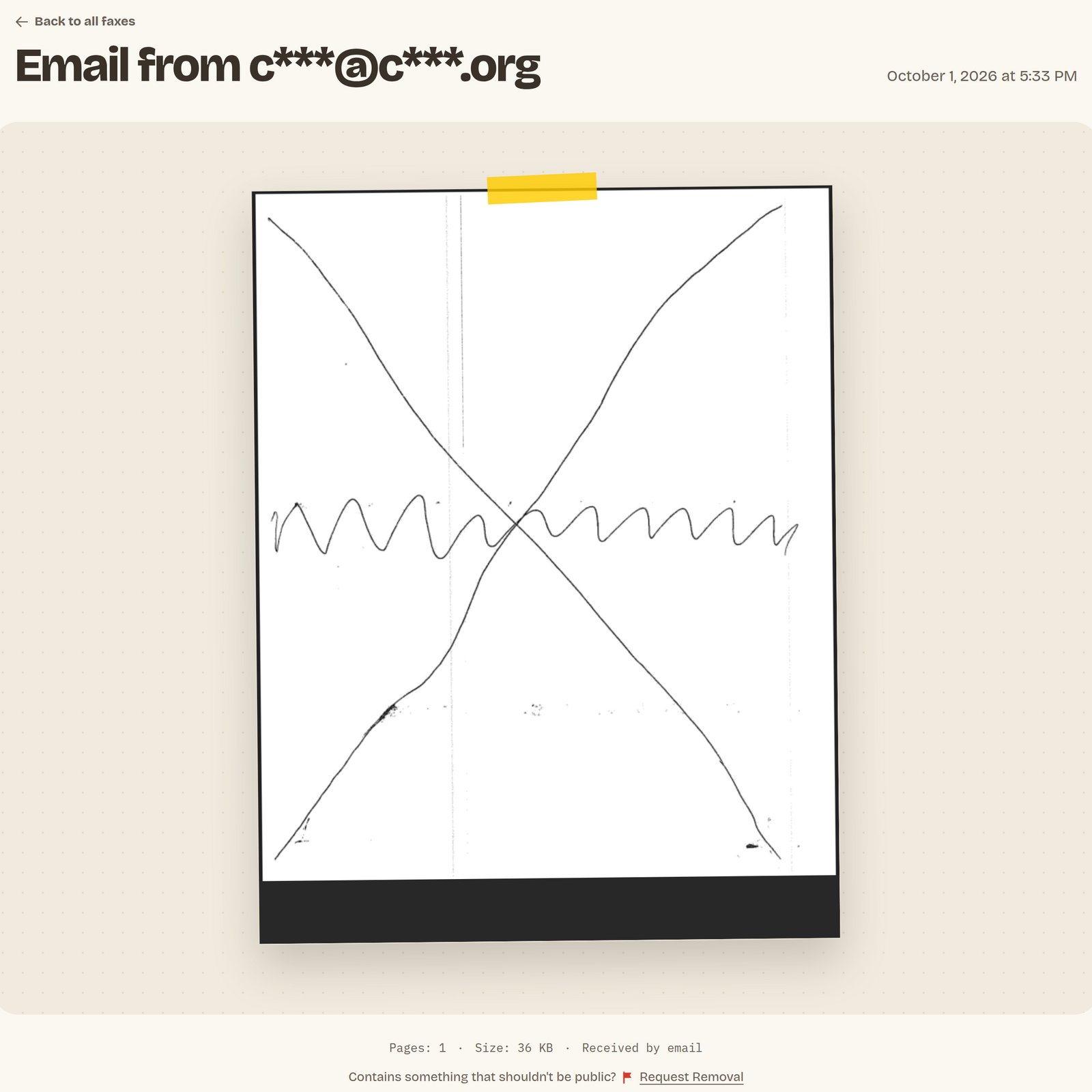
* **Title.** "Fax from" and the masked sender for a fax by phone. "Email from" and the masked sender for a test by email. See [How the sender shows](/results/sender).
* **Date and time.** When the test was received, in your own time zone.
* **The test as a PDF.** On a computer, the PDF shows in a frame on the page. On a phone, the page shows the first page as an image, with the button "Open PDF" under it.
* **A line under the test.** "Pages" with the page count, and "Size" with the size of the PDF in KB. A test by email also has the label "Received by email".
* **The removal link.** "Contains something that shouldn't be public? Request Removal". See [Remove a fax](/privacy/remove-a-fax).
 Search engines do not list fax pages.
## What to check
The page is the right way up and not on its side.
The text is easy to read, and lines and images are sharp.
"Pages" under the test shows the number of pages you sent. Open the PDF to see each page.
For a fax by phone, check the sender ID that your machine printed at the top of the page. It is part of the image, so Faxbeep does not mask it.
## The PDF of a test by email
Faxbeep does not show the file that you sent. It rebuilds each file as a PDF that holds only images of your pages. This keeps links, scripts and hidden data out of the public file. A fax by phone has no such step.
Each page of the PDF is an image. The rebuild keeps no text layer, so you cannot select or search the text. Your machine did nothing wrong.
The rebuild removes the hidden data of the file, for example an owner name, a serial number or a GPS position in an image. This data could identify you on a public page.
The rebuild also removes colour profiles. If your file used an unusual colour profile, the colours can shift a little.
## Messages instead of the test
| Message | Cause |
| - | - |
| "This fax could not be processed. Please try sending again." | Faxbeep received the test but could not make a PDF from it. Send the test again. |
| "This fax has been removed per our privacy policy." | The test was public for 30 days and was then removed. |
| "This fax has been removed per user request." | The test was removed before the end of the 30 days. |
| "Page Not Found" | No test ever had this address. Check the address, or find your test in the grid. |
A removed test keeps its page with the message, but the PDF is gone. See [Public for 30 days](/privacy/public-for-30-days).
This documentation is built and hosted on [Mintlify](https://mintlify.com), a developer documentation platform.
Search engines do not list fax pages.
## What to check
The page is the right way up and not on its side.
The text is easy to read, and lines and images are sharp.
"Pages" under the test shows the number of pages you sent. Open the PDF to see each page.
For a fax by phone, check the sender ID that your machine printed at the top of the page. It is part of the image, so Faxbeep does not mask it.
## The PDF of a test by email
Faxbeep does not show the file that you sent. It rebuilds each file as a PDF that holds only images of your pages. This keeps links, scripts and hidden data out of the public file. A fax by phone has no such step.
Each page of the PDF is an image. The rebuild keeps no text layer, so you cannot select or search the text. Your machine did nothing wrong.
The rebuild removes the hidden data of the file, for example an owner name, a serial number or a GPS position in an image. This data could identify you on a public page.
The rebuild also removes colour profiles. If your file used an unusual colour profile, the colours can shift a little.
## Messages instead of the test
| Message | Cause |
| - | - |
| "This fax could not be processed. Please try sending again." | Faxbeep received the test but could not make a PDF from it. Send the test again. |
| "This fax has been removed per our privacy policy." | The test was public for 30 days and was then removed. |
| "This fax has been removed per user request." | The test was removed before the end of the 30 days. |
| "Page Not Found" | No test ever had this address. Check the address, or find your test in the grid. |
A removed test keeps its page with the message, but the PDF is gone. See [Public for 30 days](/privacy/public-for-30-days).
This documentation is built and hosted on [Mintlify](https://mintlify.com), a developer documentation platform.