> ## Documentation Index
> Fetch the complete documentation index at: https://faxbeep.mintlify.site/llms.txt
> Use this file to discover all available pages before exploring further.
# The live grid
> How new tests appear on the faxbeep.com home page.
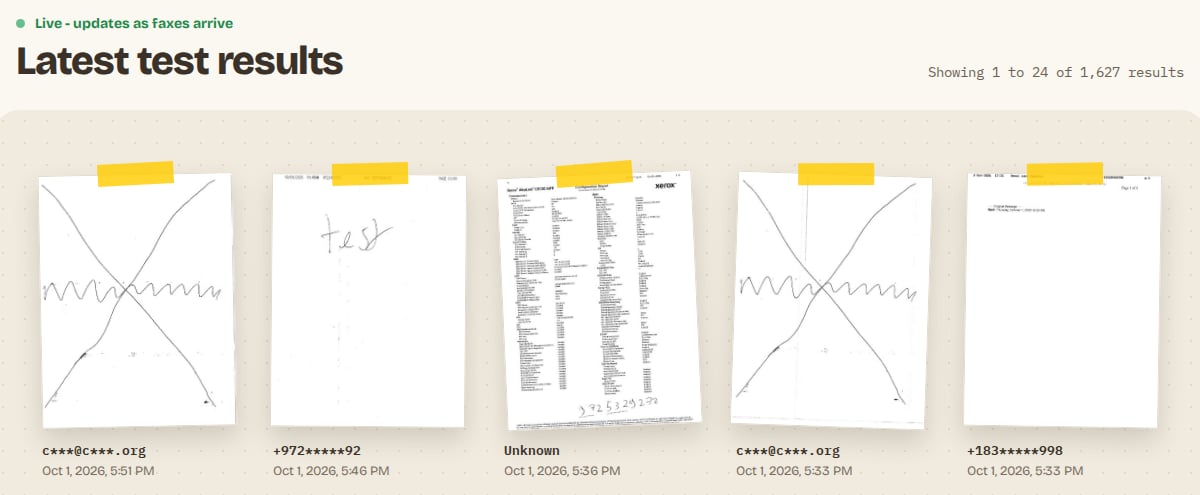
The [faxbeep.com home page](https://faxbeep.com) shows each published test in a grid under the heading "Latest test results". Each card shows the first page of a test, the sender in a masked form, and the date.
 ## Order and pages
* The newest test is first.
* One page of the grid holds 24 cards. On a computer, the page numbers are under the grid, and the line "Showing 1 to 24 of N results" is above it. On a phone, the button "Load older faxes" opens the next page.
* The card of one test opens the page of that test. See [The fax page](/results/fax-page).
## The live label
Above the heading, a label shows when the page gets live updates:
| Label | Meaning |
| - | - |
| "Live - updates as faxes arrive" | The page is connected and waits for new tests. |
| "Incoming fax..." | A test has arrived and Faxbeep is processing it. |
| No label | The page gets no live updates. Reload it to see new tests. |
A test by email gives the same "Incoming fax..." label as a fax by phone.
## New tests and the "NEW" tag
You do not need to reload the page. When a test is published, its card slides in at the top of the grid. The newest of these cards has the tag "NEW". When you reload the page, the tag goes away and the card takes its usual place in the grid.
## Order and pages
* The newest test is first.
* One page of the grid holds 24 cards. On a computer, the page numbers are under the grid, and the line "Showing 1 to 24 of N results" is above it. On a phone, the button "Load older faxes" opens the next page.
* The card of one test opens the page of that test. See [The fax page](/results/fax-page).
## The live label
Above the heading, a label shows when the page gets live updates:
| Label | Meaning |
| - | - |
| "Live - updates as faxes arrive" | The page is connected and waits for new tests. |
| "Incoming fax..." | A test has arrived and Faxbeep is processing it. |
| No label | The page gets no live updates. Reload it to see new tests. |
A test by email gives the same "Incoming fax..." label as a fax by phone.
## New tests and the "NEW" tag
You do not need to reload the page. When a test is published, its card slides in at the top of the grid. The newest of these cards has the tag "NEW". When you reload the page, the tag goes away and the card takes its usual place in the grid.
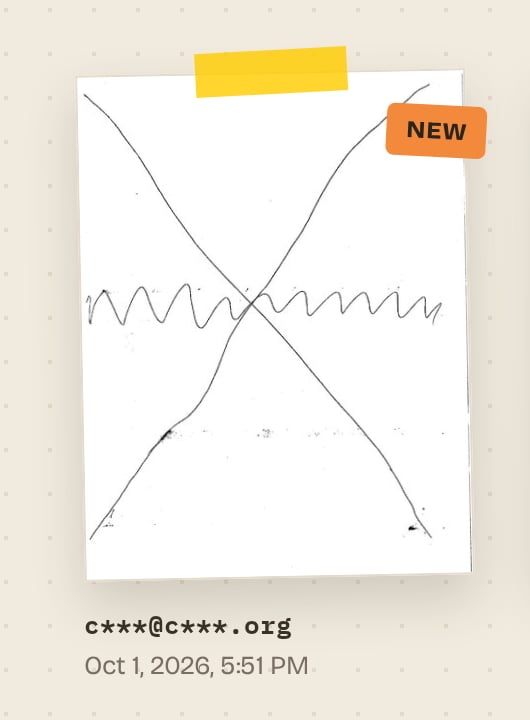 A new card shows on its own at the top, also when the test belongs to a group. After a reload, it is in its group.
## Groups in the grid
Similar tests from one sender show as one card: a stack of sheets with a count, for example "3 faxes" or "3 emails". The top sheet is the newest test of the group, and the date is the date of that test. Click the stack to open the group page. See [Groups](/results/groups).
## Dates and time zones
Dates show in your own time zone, in the format of the language of the page. If JavaScript is off in your browser, the cards show the date only, in UTC.
## A card with no picture
If Faxbeep cannot process a test, the test is still published, but its card shows a plain page icon instead of the first page. Its page says "This fax could not be processed. Please try sending again."
Why the card shows `+155*****123`, an address like `s***@e***.com`, or "Unknown".
This documentation is built and hosted on [Mintlify](https://mintlify.com), a developer documentation platform.
A new card shows on its own at the top, also when the test belongs to a group. After a reload, it is in its group.
## Groups in the grid
Similar tests from one sender show as one card: a stack of sheets with a count, for example "3 faxes" or "3 emails". The top sheet is the newest test of the group, and the date is the date of that test. Click the stack to open the group page. See [Groups](/results/groups).
## Dates and time zones
Dates show in your own time zone, in the format of the language of the page. If JavaScript is off in your browser, the cards show the date only, in UTC.
## A card with no picture
If Faxbeep cannot process a test, the test is still published, but its card shows a plain page icon instead of the first page. Its page says "This fax could not be processed. Please try sending again."
Why the card shows `+155*****123`, an address like `s***@e***.com`, or "Unknown".
This documentation is built and hosted on [Mintlify](https://mintlify.com), a developer documentation platform.